Symphony: A Case Study in Extending Learner-Centered Design Through Process Space Analysis
Chris Quintana, Jim Eng, Andrew Carra, Hsin-Kai Wu, and Elliot Soloway
Center for Highly Interactive Computing in Education
University of Michigan
1101 Beal Ave.
Ann Arbor, MI 48109 USA
+1 734 763 6988
ABSTRACT
We are exploring a new class of tools for learners: scaffolded integrated tool environments (or SITEs), which address the needs of learners trying to engage in new, complex work processes. A crucial phase within a learner-centered design approach for SITE design involves analyzing the work process to identify areas where learners need support to engage in the process. Here we discuss the design of Symphony, a SITE for high-school science students. Specifically, we discuss how the process-space model helped us analyze the science inquiry process to help us identify a detailed set of learner needs, leading to a full set of process scaffolding strategies for Symphony.
Keywords
Learner-centered design, process spaces, process scaffolding, scaffolded integrated tool environments
INTRODUCTION: MOTIVATION AND GOALS
Computer technology is becoming more pervasive in everyday work activities. As HCI professionals, we are charged with developing computer tools to support people in their work. Consider, for example, the work of scientists. Scientists perform a wide range of activities when they investigate problems: they do research, collect and visualize data, build models, etc., all in a self-coordinated, dynamic manner. As such, there is now an array of computational tools—search engines, databases, graphing, animation, and modeling tools—to support experts in scientific inquiry.
However, expert scientists are not the only people that need to engage in the process of science inquiry. It is becoming increasingly important for students to engage in and understand the science inquiry process. For example, national education standards (e.g., [10]) state that students
need to develop the ability to do scientific inquiry, to understand and develop the process skills needed to do scientific work. Science activities should not just be homework exercises, but should help students develop the skills needed to think about and affect the world around them.
Students themselves pose complex questions about their world. "Are the air pollution concentrations in my school higher than in other parts of Michigan? If so, will it affect my health?" "Why is the vegetation surrounding the streams in my community suddenly dying?" In order to investigate such questions, students need to engage in the full range of scientific activities that experts do: researching the health effects of pollution, collecting and visualizing pollution data, building models of stream ecosystems, etc. However, the science inquiry process is not so straightforward for students. Students might be able to perform each individual activity, but they lack the expertise for "putting the pieces together," for organizing the activities in the purposeful way needed to answer their questions.
Just as expert scientists have tools that support their scientific activities, so too should students. Our recent work has involved using a learner-centered design (LCD) approach [12] to develop tools for learners—a special group of users who are novices in the domain in which they are trying to work and learn. Thus we have developed a range of tools (e.g., [5], [15]) that students can use for individual inquiry activities (e.g., research, data collection, visualization, modeling, etc.) However, giving students such a learner-centered "toolbox" is not enough because students essentially do not know what to do with the tools. While expert scientists have the underlying process knowledge to engage in the inquiry process, students do not. What students lack is overarching support for the inquiry process itself.
We are moving to the next level in learner-centered support to address this. Having developed tools for the individual activities in the inquiry process, we are now putting the tools together in a single environment that offers tools plus process scaffolding to help students engage in the inquiry process. By supporting the work process itself, these scaffolded integrated tool environments (or SITEs) provide a computational framework to help students engage in complex work processes and meet the objectives outlined in current educational standards.
A challenge for developing a SITE is identifying the necessary process scaffolding that supports both the difficult explicit activities and the less-apparent implicit activities in the process. In order to identify the scaffolding, we must analyze the complex process to determine the areas where students need support. In our previous work, we have had to analyze the domains of the individual inquiry activities (e.g., TheoryBuilder supports the domain of system dynamics modeling [5]). Analyzing a single activity to design an individual tool was challenging. Now, the challenge is greater; we must analyze a process composed of several individual activities. We must understand the synergy between the range of activities in the process, and we must understand the dynamic manner in which an expert performs these activities.
Thus in order to develop comprehensive SITEs, we need to understand the complexity of the work process and what support the learner needs to engage in the process. The challenge involves identifying the process complexity along with the implicit expert knowledge and skill to determine the scaffolding needed for the SITE.
We explore these issues here by discussing the design of Symphony, a SITE for high school science students. In particular, our discussion centers on our use of process spaces [4] to analyze the complex science inquiry process and help illuminate the areas where learners need support, thus informing the design of effective process scaffolding.
SYMPHONY FOR SCIENCE INQUIRY: AN OVERVIEW
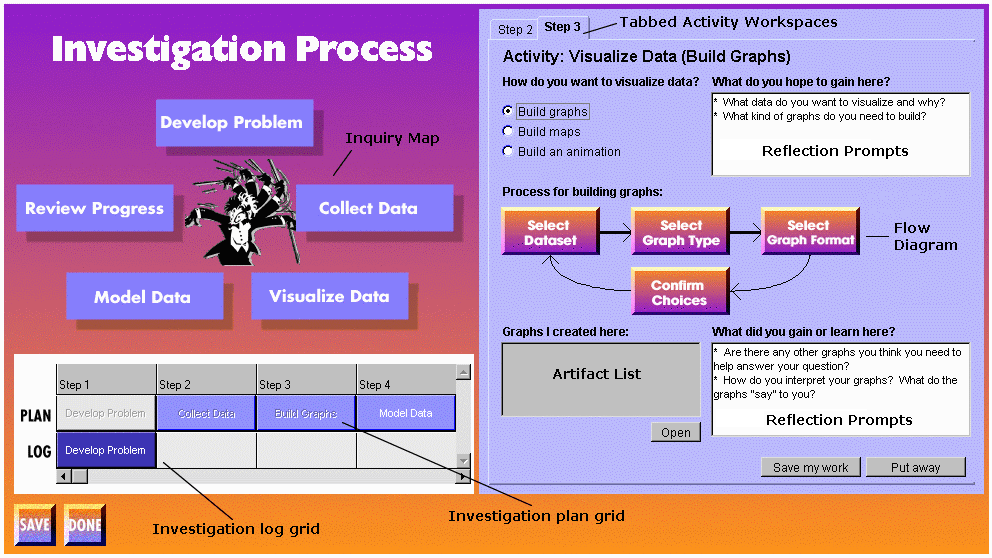
Symphony is a Java-based SITE for high-school students investigating environmental science problems (figure 1). Two students’ investigation of the air-pollution question mentioned earlier might proceed as follows:
• Online research: The students use Artemis [15] to search the web for information, such as factors leading to heavy pollution concentrations and the adverse health effects of pollution.
• Problem development and planning: Having done preliminary research, the students decide to investigate both air pollution levels near their school as compared to other areas in Michigan plus possible adverse health effects from the pollution. The students set up a preliminary plan for how they might investigate the problem.
• Data collection: To begin making the analysis needed to address their driving question, the students need to collect data. The students use DataWarehouse (our data collection tool) to collect data about air pollution (e.g., concentrations for various pollutants) and health data (e.g., respiratory disease rates) for their city and other cities in Michigan.
• Data visualization: Having collected some data, the students graph their data with VizIt (our data visualization tool) to make some sense of their data. They might generate graphs comparing the pollution levels in their city to other cities in Michigan. They may graph pollution and health data to see if there are correlations between pollution and health effects.
• Progress review and plan revision: The students review their results, looking at their graphs in terms of their driving question. They realize that the datasets they collected are incomplete, so their analysis is inconclusive. They now need to decide what new activities to perform.
• More data collection and visualization: Given their inconclusive results, the students collect more data and generate new graphs with the new data.
• Progress review and plan revision: The students now review the new graphs, which seem to show that the air pollution levels in their city are higher than in other cities. Given these new results, the students revise their plan to see what other damage such high pollution levels can cause, and how those levels might be reduced.
• System modeling: The students use TheoryBuilder [5] to model the factors that contribute to pollution concentration. The student run simulations based on their models to discover scenarios resulting in lower pollution concentrations for the community.
This small example describes activities that students perform to investigate science problems. Some activities are tool-based (e.g., data collection, visualization, etc.). Some are more "meta-level" (e.g., planning, reviewing progress, etc.). A SITE needs to support both kinds of activities for the student.
Along these lines, students need to have support for creating and revising their plan throughout the investigation. As an introductory scaffolding example, Symphony displays an inquiry map and a flexible planning grid (figure 1) to allow students to see the possible inquiry activities and drag items from the map to the planning grid. Activities can be moved around in the plan or removed as the plan is revised.
Other tools do not offer the full range of support needed by students. Some tools support a more static, simplified version of the inquiry process (e.g., [7]). Some environments may not integrate a wide range of tools (e.g., [14]). And some environments provide the necessary tools in a realistic representation of the scientist’s domain, but lack scaffolding to help student see how to engage in the process (e.g., [11]). These tools certainly have their merits. However, we feel that students need both the tools and a wide range of process scaffolding within a single package to help them effectively engage in the range of scientific activities.
How did we determine the scaffolding that will be necessary for a SITE like Symphony? How can we analyze the work process (i.e., the science inquiry process) in order to understand the process complexity and identify the areas where learners will need support?
We discuss these questions by illustrating how we used the process-space model to identify a more detailed set of learners’ needs, and thus develop a more focused set of scaffolding strategies for Symphony.
LEARNER-CENTERED DESIGN AND SITES
Learner-centered design is an evolving design approach for building tools for learners. We can characterize the distinction between learners (i.e., domain novices) and users (i.e., domain experts) along three dimensions: growth, diversity, and motivation [12]. While it is important for designers of learner-centered tools to consider the diversity of learners (i.e., the cultural, gender, and developmental differences), in this paper we focus primarily on growth and motivation:
• Growth: Learners need to grow in their domain expertise. Learner-centered tools should present the work domain in a manner that meets the learners’ current level of expertise and supports them in transitioning to more sophisticated, more complex activities. For example, activities like planning and reviewing progress are not apparent to the novice learner. A SITE can thus explicitly represent activities that are new to the learner and structure those activities to help the learner handle initial problems and undertake more complex problems.
• Motivation: Learners do not necessarily have the intrinsic motivation that experts have. Domain complexity can pose obstacles to learners, resulting in frustration and loss of interest. Learner-centered tools should support learners in completing complex (and possibly overwhelming) work activities to keep them focused on their work. For example, activities such as data collection can be difficult for learners to perform. A SITE can reduce the complexity of work activities, putting the activities within the learners’ reach, giving them immediate successes, and keeping them motivated to pursue their problem.
Our challenge is to identify the necessary process scaffolding strategies for a SITE to address the growth and motivation of students engaging in science inquiry. Thus within an LCD process, we need to understand the complexity of the work, identify where the learners need support, and identify scaffolding strategies to address those needs. In the following sections, we discuss how we addressed this challenge in designing Symphony. We will first describe the complexity of science problems and the inquiry process to illustrate why learners need support. Next we focus on how we used the process-space model to help identify the set of learners’ needs. Finally, we give a more detailed review of Symphony to illustrate the implementation of the process scaffolding.
COMPLEXITY OF SCIENCE PROBLEMS AND THE SCIENCE INQUIRY PROCESS
The domain of science inquiry can be difficult for novices to work in. Much of the complexity in the inquiry process arises from the fact that science problems can have characteristics of so-called "wicked" or "ill-structured" problems [1], leading to a problem-solving process that is described as complex, chaotic, and opportunity-driven [3] (table 1).
Science problems contain "wickedness" |
Characteristics of the science inquiry process |
| There are no pre-defined sequences of operations to solve a science problem. Different problem-solvers may perform different activities to investigate the same problem. | Complex: The process involves completing a wide range of activities (e.g., planning, data collection, modeling, analysis, etc.) |
| Science problems can be ill-formulated and non-deterministic. Problem-solvers need to explore and try different alternatives to better define the investigation. | Chaotic: There is no linear path through the space of process activities. Rather, problem-solvers iterate (or "bounce around") among the different process activities. |
| There are no explicit stopping rules to define when the problem is "solved". Accumulated results constantly define the direction of the investigation. | Opportunity-driven: In moving through the process, problem-solvers are constantly reviewing progress and selecting activities that they feel will bring them closer to an adequate answer. |
Table 1: Complexity of the science inquiry process
Thus, we can begin to see that the nature of the work process we are supporting with a SITE is different from other processes we have designed tools for in previous work. Consider the domain of system dynamics modeling supported by TheoryBuilder [5]. While the modeling process is complex, it has less of the chaotic, opportunity-driven nature than the inquiry process. The modeling process is more straightforward and well-defined.
The challenge in designing a SITE like Symphony is to uncover the difficulty and the "implicitness" in such a complex process to help define the necessary learner-centered support. The complex nature of the process requires that we illustrate all work activities in the process, both explicit (e.g., building graphs) and implicit (e.g., planning). Its chaotic nature requires that we support the learner in charting a path through the non-sequential process activities. Finally, its opportunity-driven nature requires that we describe the tacit knowledge that experts have in selecting appropriate activities to perform and in refining the direction of the investigation.
We need to uncover this information to better understand the areas where learners need support to engage in the process. By identifying a larger, more fine-grained set of learners’ needs, we can identify a more complete set of scaffolding strategies and strengthen the learner support in the software. In order to perform this needs analysis, we turn to the process-space model.
USING PROCESS SPACES TO IDENTIFY LEARNERS’ NEEDS
The stated goal of the process-space model is to "define the environment in which the work processes take place" to "make many of the tangible and definable aspects of work more visible" [4]. This fits with the LCD approach: we can use process spaces to uncover more components of the complex work process and thus identify the areas where the learner needs support to compose their own path through the process.
A process space is defined in terms of the components that comprise the work process, i.e., the roles, activities, artifacts, information objects, and services required to engage in the work [4]. In this section, we discuss how we used this process-space model to analyze the science inquiry process, making some observations about the results of the analysis and noting how the analysis led us to a set of learners’ needs.
Defining Process Spaces for Science Inquiry
To perform our analysis of the science inquiry process, we observed expert scientists in their work and looked at other studies of scientists’ work (e.g., [13]). Also, we worked with our educational partners (UM School of Education and Ann Arbor high-school teachers) who helped us identify important process activities for high-school students.
We began building the process space for the science inquiry process by identifying the activities, artifacts, information objects, and services used in the process. (While the process-space model allows multiple roles for collaborative work, we only include one role for this work: the learner. Thus, we do not list the role component in our process spaces). The process-space model only identifies the major components, but as we continued our analysis, we refined the model to identify more fine-grained categories for the components. We identified three types of activities: metaprocess, reflective, and tool-based, with metaprocess and reflective activities being the more implicit activities performed by experts. We identified three kinds of information objects needed to perform the activities: explanatory, procedural, and activity-option information. Finally, we identified the services that were used in the process: computational tools, non-computational tools (e.g., a notebook), and none. (We maintained the artifact categories implied in [4]: production and mediation.)
Noting that a process space can itself contain other process spaces [4], we also described the set of process spaces for science inquiry. Looking at the complete set of process spaces, we were able to identify different levels of work. The planning level contains the single process space involved with planning the investigation. The activity level contained two process spaces for reflective activities (develop problem and review progress) and three process spaces for tool-based activities (collect data, visualize data, model data).
The upper portion of table 2 summarizes the results of the process space analysis.
Observations on the Process Space Analysis
The process space analysis helped us understand the inquiry process and uncover a set of specific learners’ needs with respect to each process space component (lower portion of table 2):
• Activities: The analysis identified the entire range of metaprocess, reflective, and tool-based activities in the inquiry process. Also, our categorization of activities identified that the metaprocess and reflective activities are implicit to the expert and not necessarily apparent to the learner. It is important to make all work activities visible to help the learner form a conceptual model of the work process [2]. The process space analysis helped identify the "hidden" tasks that learners need to be aware of and that consequently need to be explicitly represented by the SITE.
• Artifacts: The analysis identified the range of artifacts that are produced throughout the investigation: plans, research notes, datasets, graphs, models, etc. In a lengthy investigation (e.g., a fifteen-day investigation by high-school sophomores), the number of artifacts can be quite large. It is important to periodically review the artifacts produced to help define the direction of the investigation [13], so managing the range of artifacts is crucial. But as the number of artifacts grows, it becomes more complex and more time-consuming to organize the artifacts. If experts can have a problem effectively managing their artifacts, learners certainly need artifact organization by the SITE to help focus more on their investigation and less on this "housekeeping chore".
• Information Objects: The analysis identified the large amount of well-organized domain knowledge that scientists employ to plan and conduct their investigation. Learners, being novices, do not know this information, suggesting the need for the SITE to provide this information to help learners complete the activities in the process.
• Services: The analysis identified the functional set of computational tools that need to be incorporated in the SITE. The analysis also identified where experts have minimal tool support. Experts possess process knowledge needed to perform activities with only a notebook or even without tool support. Learners, however, need additional tool support. For example, where an expert can do much of their planning internally without any tool support, learners, lacking the process knowledge of the expert, can benefit from planning services. A SITE should not only
Process space components |
Process space gestalt |
|||||
Activities |
Artifacts |
Information Objects |
Services |
|||
Process space analysis |
Planning Level |
• [Metaprocess]
Select activities to add to or revise plan. • [Metaprocess] Select a new activity (or sub-activity) from the plan to perform. • [Metaprocess] Review previously logged activities. |
[Mediation/Production] • Plan • Log |
• [Activity
option] List of possible metaprocess activities to perform. • [Explanatory] Rationales and information about the different metaprocess activities. • [Activity option] List of possible inquiry activities to pursue. • [Explanatory] Rationales for the different inquiry activities. • [Activity option] Constraint information describing what inquiry activities are possible. |
Scientists’ notebook, or internal (experts do it in their heads) | Science inquiry process requires flexible, non-linear movement between the range of process spaces that make up the process |
Activity Level: Generalized reflective activity (One each for develop problem and review progress) |
[Reflective] Think about and record pieces of information needed in activity (e.g., driving question, hypotheses, research notes, etc.) | [Production] Notes and other pieces of information | [Explanatory] Information describing the different pieces of information the learner should reflect on. | Scientist’s notebook, or internal | ||
Activity Level: Generalized tool-based activity (One each for collect data, visualize data, model data) |
• [Metaprocess]
Select a sub-activity (e.g., data search is a sub-activity for collecting data.) • [Reflective] Think about the objectives for the activity and the results of the activity. • [Tool-based] Use the tool to perform the activity. |
• [Production]
Artifacts produced by the tool. • [Production] Notes |
• [Explanatory]
Descriptions of the sub-activity choices. • [Procedural] Description of the procedure needed to use the tool. • [Explanatory] Rationales for the different activities in the tool procedure. |
Computational tools used in the activity (e.g., database, visualization and modeling tools) | ||
Implications for learner-centered design |
Specific learners’ |
Need to
make implicit activities explicit: • Metaprocess activities • Reflective activities Need to make visible the entire collection of activities in the inquiry process • Planning • Reflective (Develop problem, review progress) • Tool-based (Collect data, visualize data, model) |
Need to organize artifacts | •
Need activity option information to see what metaprocess activities are currently possible
("what can I do now?") • Need activity option information to see what inquiry activities are currently possible ("what can I add to my plan?") • Need procedural information to see how to perform some tool-based activities. • Need explanatory information to see activity rationales. • Need reflective information to see "things to think about" during reflective activities. |
Need explicit services for planning and reflection. | Need to
support non—linear movement through the process • Between planning and activity level • Among different activities in the activity level |
Scaffolding strategies |
Explicit
workspace for all process spaces • Planning workspace • Activity workspaces |
Artifact logging and "table of contents" | •
Process maps for illustrating activity possibilities • Flow diagrams for procedural information • Activity-based help text for activity rationales • Reflection prompts to describe reflective information |
•
Plan/log grid • Reflection areas in workspaces |
•
Simultaneous views of planning and activity work areas • Tabbed activity workspaces to facilitate movement between activities |
|
Table 2: Process space analysis and the implications for learner-centered design. The categorization of process-space components is shown in brackets.
Figure 1: Symphony main screen
include the identified set of computational tools, but also missing tools that learners might need.
Aside from the information that we gained by looking at the individual process spaces, the analysis also identified an overall set of process spaces, (i.e., the process-space gestalt). We noted that engaging in the science inquiry process essentially means moving among the different process spaces (e.g., moving from planning to data collection to visualization to planning, etc.) Scientists move among the different process spaces in a chaotic, non-sequential manner. Learners may not be used to such non-linear work, being more familiar with straightforward linear work with a linear series of steps. A SITE needs to support learners in engaging in the non-linear work patterns inherent in the inquiry process.
IMPLEMENTING PROCESS SCAFFOLDING IN SYMPHONY
A review of Symphony illustrates some of the process scaffolding that we incorporated to address the learners’ needs identified in the process space analysis. We are currently on the third major iteration of the software. We tested the previous two versions with a small number of high-school students who used Symphony to investigate environmental science questions. Additionally, we performed several design reviews within our group, which consists of members of our computer science department, School of Education, and local high-school teachers. The current version is being tested this school year by high-school students using Symphony to investigate long-term projects.
We include a more detailed list of our scaffolding strategies in table 2. Here, we highlight three scaffolding strategies to demonstrate how process scaffolding can support a learner engaging in the science inquiry process.
Providing information
Recall that students need a wide variety of information to engage in the inquiry process, such as activity-option information to see what possible metaprocess activities they can perform and what possible inquiry activities they can add to their plan. We present activity-option information through process maps.
At the planning level, students need to see what metaprocess activities are possible and what steps to take next in the investigation. Metaprocess activities are illustrated in the Conductor window (figure 2). The possible metaprocess activities in the Conductor window include: revising the plan, doing the next activity in the plan, revisiting the log, etc. The space of metaprocess activities is context-sensitive, changing as different metaprocess activities become possible at different points of the investigation. The activity-space information conveyed by the Conductor window thus serves to help students answer the question "what can I do next?"
Another process map is the inquiry map on the main screen (figure 1). As students create and revise their plan, they need to see what activities can be added to the plan, e.g., develop problem, collect data, etc. Simple constraint information is displayed on the inquiry map, indicating through color changes which inquiry activity was most
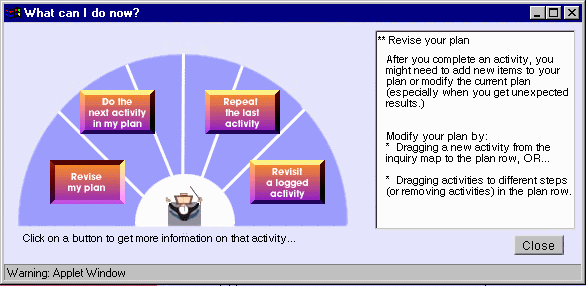
Figure 2: "Conductor" window
recently completed, and which inquiry activities might be logical next steps.
Finally, Symphony uses flow diagrams to explain procedural tasks. Figure 1 illustrates the flow diagram describing the procedure for building graphs. The different tool-based activities use flow diagrams to describe the procedure for which the tool is used. Pressing each button in the flow diagram launches the appropriate component of the tool. The computational tools in Symphony lie behind these more "procedurally-oriented" diagrams that both invoke a tool and convey information to help learners see "how do I do this?"
Managing artifacts
As mentioned, learners need support for managing the range of artifacts produced throughout the investigation. One example of how Symphony provides automatic artifact information is the artifact "table of contents" (figure 3).
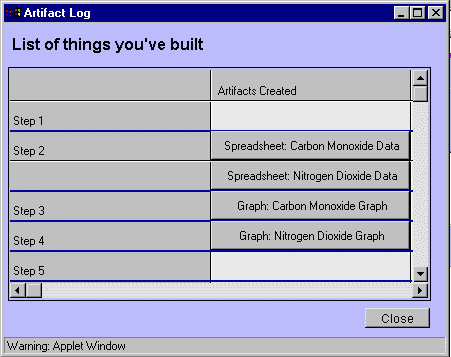
Figure 3: Artifact "table of contents"
The table of contents lists and provides quick access to all of the artifacts the students have produced throughout the investigation. In figure 3, we see a small slice of the students’ investigation. In the second step of the investigation, the student collected two sets of air pollution data. In the third and fourth steps, they created graphs to illustrate pollution data. The items in the "Artifacts Created" column are actually buttons that bring up the artifact named in the button. This example is small, only displaying four artifacts, but as investigations become larger, the number of artifacts grows quickly. Being able to easily manage and access artifacts is useful when students need to review their progress, build their argument, and revise their plan. The table of contents removes the burden for the student of having to create and search disk directories for the artifacts that they are interested in.
Supporting non-linear work
Throughout the inquiry process, learners need to iterate between the planning level and the activity level (e.g., complete an activity, refine the plan, complete an activity, refine the plan, etc.). The learner will also have to iterate among activities in the activity level (e.g., develop the problem, visualize data, review the problem to refine hypotheses, visualize more data, etc.)
In order to support iteration, we designed the main screen to display both the planning workspace and individual activity workspaces, thus allowing a simultaneous view of the planning level and activity level (figure 1). In earlier versions, our strategy to support iteration involved having the planning workspace in a window while individual activity workspaces opened in separate windows. However, our student testers had problems with this approach. Students inevitably had several activity workspaces open, resulting in screen real-estate problems that interfered with the work. The activity windows covered the planning window, so it was difficult to move back to the planning level. Also, it was difficult to move between activity workspaces because of the number of windows. Students suggested and have been favorable to the current approach. Both work levels are visible at all times, making it easier to revise the plan and access logged activities as needed throughout the investigation.
Because of this single main window approach, we needed to design a better way of having multiple activity workspaces open simultaneously. We made the activity level area of the main screen a tabbed work area (figure 1), where multiple individual activity workspaces can be accessed by tabs. Again, we are getting favorable feedback from the student testers who have reviewed this version, and in some small tests, we have seen how students begin to keep multiple workspaces open and how they are facilitated in quickly moving between workspaces.
CONCLUDING REMARKS AND FUTURE RESEARCH
With Symphony, we are exploring SITEs and the use of process scaffolding to support learners working on and developing an understanding of complex work processes (e.g., the science inquiry process). With effective scaffolding, we can support the entire range of activities that make up the complex process, both the difficult and implicit activities that learners need to complete. We found that the process-space model provided us with a rich analytic vocabulary to help us analyze the complex science inquiry process and identify a detailed set of learners’ needs to be addressed by process scaffolding. Many cognitive analysis methods (e.g., GOMS) focus on tasks and the procedural knowledge needed to perform tasks [6], but not on other components we needed for our analysis. Analysis methods such as these could, in fact, be used in conjunction with the process-space model to determine procedural information.
Other analysis methods focus on analyzing work context. The speech acts model [8] is used in workflow analysis. However, the model’s emphasis on work as conversation and negotiation between parties in the process was not suited for our work in analyzing the science inquiry process. Activity theory is similar to the process space model. However, even proponents of activity theory state that it can be difficult to use for design (e.g., [9]). We found that the process-space model gave us a rich vocabulary for our design and was straightforward to incorporate in our design process.
In the end, we feel that this case study contributes the following:
• A framework for performing a learner-centered needs analysis. By refining a method for identifying a more detailed set of learner needs, we can develop a stronger set of scaffolding strategies to support the learner.
• An initial set of process scaffolding strategies to support learners engaging in complex work processes such as science inquiry.
• A software implementation to test our framework for identifying leaner needs.
At this writing, we are currently conducting more extensive user testing, with a set of ninth grade students using Symphony daily in class to investigate air quality problems of increasing complexity. Our early results are encouraging, as we are seeing the students working effectively with Symphony on their science questions. As we continue with this project, we want to explore further refinements of both our LCD methodology and the process-space model, seeing the strengths and weaknesses of the model. We are also looking at how our design process extends towards developing collaborative tools for science inquiry, exploring the effects multiple roles in the process space analysis on the design of our tools.
ACKNOWLEDGMENTS
The authors would like to thank the programmers, artists, teachers, students, and faculty involved with the Symphony project. This work is funded by grants from the National Science Foundation and the National Physical Science Consortium.
REFERENCES
1. Buchanan, R. Wicked Problems in Design Thinking. In V. Margolin and R. Buchanan (Eds.) The Idea of Design. MIT Press, 1995.
2. Collins, A., Brown, J.S., and Newman, S.E. Cognitive Apprenticeship: Teaching the Crafts of Reading, Writing, and Mathematics. In L.B. Resnick (Ed.) Knowing, Learning, and Instruction: Essays in Honor of Robert Glaser, Lawrence Erlbaum Associates, Hillsdale NJ, 1989.
3. Conklin, E.J. and Weil, W. Wicked Problems: Naming the Pain in Organizations. http://www.3mco.fi/meetingnetwork/readingroom/gdss_wicked.html.
4. Fitzpatrick, G., and Welsh, J. Process Support: Inflexible Imposition or Chaotic Composition. Interacting with Computers 7, 2, 1995.
5. Jackson, S.L., Krajcik, J., and Soloway, E. The Design of Guided Learner-Adaptable Scaffolding in Interactive Learning Environments. Proceedings of CHI ’98 (Los Angeles CA, May 1998), ACM Press, 187-194.
6. John, B.E. and Kieras, D.E. The GOMS Family of Analysis Techniques: Tools for Design and Evaluation. Technical Report CMU-CS-94-181, School of Computer Science, Carnegie-Mellon University.
7. Linn, M.C. Key to the Information Highway. Communications of the ACM, 39, 4, 1996, 34-35.
8. Medina-Mora, R., Winograd, T., Flores, R., and Flores, F. The Action Workflow Approach To Workflow Management Technology. Proceedings of CSCW ’92 (Toronto, Canada), ACM Press. 281-288.
9. Nardi, B.A. Studying Context: A Comparison of Activity Theory, Situated Action Models, and Distributed Cognition. Proceedings of the EWHCI ‘92, 352-359.
10. National Research Council. National Science Education Standards. National Academy Press, Washington DC, 1996.
11. Sandoval, W.A. and Reiser, B.J. Evolving Explanations in High School Biology. Presented at the Annual Meeting of the American Education Research Association. Chicago, March 24-28, 1997, http://www.ls.sesp.nwu.edu/bguile/papers.html.
12. Soloway, E, Jackson, S.L, Klein, J., et. al. Learning Theory in Practice: Case Studies of Learner-Centered Design. Proceedings of CHI ’96 (Vancouver, Canada, April 1996) ACM Press.
13. Springmeyer, R. R., Blattner, M. M., and Max, N. L. A Characterization of the Scientific Data Analysis Process. Proceedings of IEEE Visualization ‘92, IEEE Press, 235-242.
14. Suthers, D., Toth, E.E., and Weiner, A. An Integrated Approach to Implementing Collaborative Inquiry in the Classroom. Proceedings of CSCL ’97 (Toronto, Canada, 1997), 10-14.
15. Wallace, R., Soloway, E., Krajcik, J., et.al. ARTEMIS: Learner-Centered Design of an Information Seeking Environment for K-12 Education. Proceedings of CHI ’98 (Los Angeles CA, May 1998), ACM Press, 195-202.